


Category: Technology
vulkan run time libraries
What is Vulkan Run Time Library? Do you need it, and how can you uninstall/reinstall it on Windows 10
Vulkan Runtime Libraries may be installed on your computer. If you aren’t sure how or why it was installed, don’t worry. It is not malware or a virus. It won’t cause any damage to your Windows operating system, and you don’t have to delete it.
A runtime library can be described as a set of programs used at program runtime to provide native functions and services. It typically contains many programs or tasks that are frequently used by different programs. A runtime library allows a program to execute with all its functionality. In addition, it provides additional program resources that are necessary to the main program.
What Is Vulkan Run Time Libraries
Vulkan Run Time Libraries (APIs) are Application Programming Interfaces used for computer graphics. An API is a collection of subroutine definitions and protocols that can be used to build application software. It is, in general, a set of clearly defined communication methods between different software components.
Vulkan Run Time Libraries, a new 3D graphic standard, is a 3D graphics programming interface like DirectX and OpenGL. It is used for gaming and improved 3D performance. Vulkan is the most recent version of OpenGL, whereas DirectX12 is the current gaming graphic standard. Vulkan is designed to provide better performance and more balanced CPU/GPU utilization. Vulkan can distribute work more evenly among multiple CPU cores, in addition to consuming less CPU.
Vulkan Run Time Libraries are a normal part of Windows. This is especially true if you use Nvidia drivers or any other software that requires Vulkan Run Time Libraries. It will usually install itself automatically without your permission. Vulkan Runtime Libraries should be left on your system if you play computer games often or use other programs that require graphics. Vulkan Run Time Libraries may not be noticed if you don’t play games or use any other software that requires graphics. It is possible to uninstall it, but it may be challenging to reinstall it. Vulkan Run Time Libraries installs with graphics drivers, so you will need to reinstall these first.
Vulkan is still a relatively new API. Not many games support it. Quake, Dota 2, GRID Autosport, and Doom, Mad Max are the most popular games that support Vulcan rendering API. You can also play older games with it. Make sure to have Vulkan Runtime Libraries installed.
How to Uninstall and Reinstall Vulkan Run Time Library Libraries
You can remove/delete Vulkan Run Time Libraries if you are sure. To do this, type “run” into Search and select the “Run” result.
0xa00f4244 nocamerasareattached
How to fix the Windows 10 Error Code No Camera Attached (0xa00f4244)
Are you having trouble with the 0xa00f4244 error code? Here are the steps to get rid of the nocamerasareattached error code 0xa00f4244.
Do you have trouble running the Windows 10 camera app?
Perhaps you are experiencing the0xa00f4244 nocamerasareattached error, or the message “we cannot find your camera” may be displayed. Sometimes the error message “no cameras attached” might be shown instead.
Don’t worry. These tested methods will fix the 0xa00f4244 error code nocamerasareattached and allow you to restart your Windows camera.
1. Check Your Antivirus ProgramThe antivirus program is a vital lifeline for Windows computers. However, it can sometimes cause problems with other programs. Check your antivirus settings to make sure it isn’t blocking your camera app.
You can temporarily disable your antivirus to make sure your camera is working correctly, even if all settings are correct.
- 2. Turn on the Camera App
The 0xa00f4244 error code nocamerasareattached is often caused by the Windows Camera app is turned off. Press the following button to ensure this is not the case for you. Windows Key + I To open the Settings, Select the appropriate option. Privacy.
Click on the button below to continueCameraClick on the toggle button to activate it if it is so set Off.

This may have caused this error code 0xa00f4244. Follow the steps above to resolve it.
- 3. Scan for Malware & Viruses
Malware and viruses can cause problems with the smooth functioning of Windows computers. They can also cause issues with device drivers, so it may be a good idea to scan your computer for these vulnerabilities.
You can scan your system using the Windows Defender, a free tool from Windows that detects and removes malware and viruses.
Go to settings > Update and Security. Click on the link to continue. Windows Security>Protection against viruses and other threats.

Click on the button below to continue to check out the scan options. Choose! Windows Defender Offline scan it, and. Now scan.
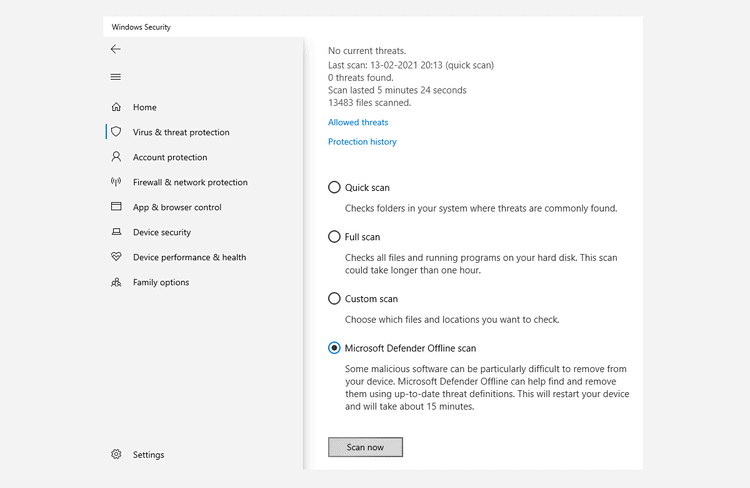
Windows 10 will be restarted and run a scan. To review the report, open Windows Defender in the same manner. Again, you will be able to see any problems.
- 4. Check the Camera Driver
If none of the above work, you will need to look at your camera’s device drivers.
A device driver allows your computer’s hardware to communicate with its software. For example, if your camera driver is not working correctly, the error code 0xa00f4244 may be caused by a hardware problem.
These steps will help you to verify your Windows 10 camera driver.
Then, open the device Manager AppUse the search bar.
Locate the Cameras icon.
Right-click on the Camera button on your device.Update your driver
Then, select Automatically search for driver
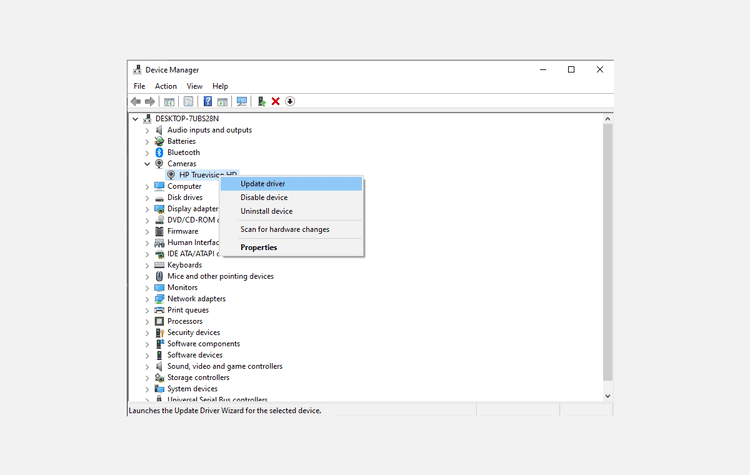
The Device Manager will then search your computer for the latest driver.
- 5. Reset the Camera App
If none of the above solutions have worked, try this. Sometimes the error 0xa00f4244 is caused by changes or problems in the Camera app.
Your camera can be reset to its pre-modified settings by performing a simple reset. To get started, follow the steps below:
1. 1.Settings > Apps > Features & Apps.
2. Click on the camera > Advanced Settings
3. Click on the button below.ResetClick the button to reset your Camera App.
This will cause a complete reset of any changes made to your camera settings.
- 6. Reinstall Camera Driver
If the camera driver is the cause of 0xa00f4244 nocamerasareattached, then removing and reinstalling it should do the trick.
Click the button below to do soWindows Key + RTypedevmgmt.mscHit, and. Enter. Expand the Cameras section in the Device Manager and click on uninstall the device.
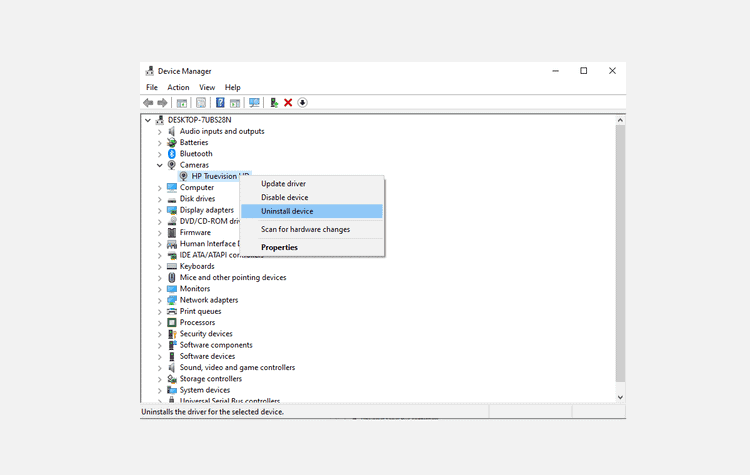
Reboot your computer after the driver has been removed. Open the Device Manager and click “OK” to restart your computer. Then, check for hardware changes to install the driver again.

This method can be used if your computer is experiencing a 0xa00f4244 error due to a corrupted camera driver.
- 7 Reset Your PC
If all the previous methods to fix the 0xa00f4244 error have failed, you can try this last trick: a Windows reset.
You have two options when you reset Windows 10. Start by going to the Windows search bar and typing “Windows 10 reset” in the box. This PC can be reset.
Click on the next button to reset your PCOption. Click on the Next Window. Get Started.

There are two choices available to you. You have two options. Keep my files, go forTake EverythingIf you’re looking for a new start.
Next, you will need to select how you wish to reinstall Windows.CloudOr by a local Reinstall. The Cloud option downloads Windows 10 from the cloud, while the Local version stores a Windows 10 image on your device.

Please take note if you’re using a laptop to do the reset, ensure that it is connected to a charging source. You will not be able to proceed with the reset if it isn’t.
Select one and then click on next to proceed with the reset. It might take some time to reset your computer. Click on the next button reset to start the process finally.
Windows 10 0xa00f4244 nocamerasareattached Error Solved
The Windows 10 Camera app, especially in post-Covid times, is an indispensable utility for communication. It has made it common to work from home instead of something that happens once in a while.
Windows Could Not Automatically Detect This Network’s Proxy Settings
Seeing the “Windows could not immediately detect this network’s proxy setups” mistake on your COMPUTER? Below are the steps to fix it.
After having Windows repair a network error for you, you could have come across this message:
Windows could not automatically detect this network’s proxy settings.
What does this mean, as well as just how do you fix it? Allows have a look at Windows’ proxy settings and also the actions to fix this.
1. Reboot Your PC (Computer) and Router
Before you launch into sophisticated troubleshooting, it’s constantly a good concept to reactivate your tools first. There’s a possibility that this will certainly improve your issue in a few minutes.
Because this mistake is typically connected to reconfigure settings on one computer, reactivating your router most likely will not have an effect. But it’s still worth a shot whenever you encounter network troubles of any type of kind.
If, after you reboot your computer and router, the issue hasn’t repaired itself, advance with the extra thorough actions.
2. Review Proxy Settings in Windows
Due to the fact that this issue is related to your Windows proxy settings, that’s a sensible top place to examine. To accessibility proxy settings in Windows 10, open Setups, pick the Network & Web group, as well as button to the Proxy tab on the left sidebar.
Right here you’ll see a checklist of options associated with proxy servers. If you don’t utilize a proxy (as holds true for many home individuals), make certain that Use a proxy web server near the bottom is shut off. Leave Automatically spot settings on if it is currently.
For individuals that do connect with a proxy, such as in a service or school atmosphere, you may wish to contact your system manager to ensure you have the right proxy details here.
Hereafter, try reconnecting to the network again. If you still get the mistake, switch off Instantly detect setups in the proxy choices and also attempt once again.

What’s a Proxy Server?
We don’t want to bore you with the details while you try to repair this proxy setting concern. Nevertheless, it’s useful to recognize the basics of what a proxy really is, as well as why Windows can run into troubles with it.
Basically, a proxy server functions as a middleman in between your computer as well as the net. Rather than you attaching straight to the net, you connect to the web server, which gets hold of info from the web for you.
These are most common in organization as well as school use, where system administrators use them for security and efficiency. It’s extremely not likely that you would utilize a proxy web server on your residence network, unless you especially established one up. This is why you ought to remove any kind of proxy setups that could exist when you face this issue.
3. Run the Network Adapter Troubleshooter
When you right-click on the network connection icon in your System Tray as well as pick to fix, it runs the Web Connections troubleshooter. This is what causes the “Windows might not detect proxy settings” error. However there’s another network troubleshooter you can run that could supply more assistance.
Open Setups again and also see Update & Safety > Troubleshoot. Click Extra troubleshooters, after that choose Network Adapter from the checklist as well as walk through the troubleshooter. As seasoned Windows customers know, these troubleshooters do not constantly repair your issue, yet it’s still worth a shot.
4. Auto-Obtain IP Address and DNS Info
Proxy servers are not the only problem. There are many steps that can be used to troubleshoot them. While we’ll give you more information, keep in mind that troubleshooting is the same for all proxy servers. Fixing the Windows “No Internet Access” error From this point forward.
This error can also be caused by misconfigured DNS or IP addresses, although it is not directly related to proxy settings. These errors can be checked by visiting Settings > Network & internet > Status Click here Click here Modify adapter options Click the button to view all of your network connections. Double-click the one that interests you.
Click here to go to the Properties Double-click and button Internet Protocol Version 4 In the list. Both are required.Automatically obtain an IP address And Automatically find DNS server address Select. This will stop you from being able to get online if your settings are not correct.

5. Update or Roll Back Your Network Driver
Connection problems can be caused by an outdated network driver. You might also have installed an outdated network driver. You can either replace the driver or fix the proxy message problem.
Right-click the Start button to choose Device Manager To open this utility. Expand the Network adapters Double-click the connection that you are using in the section.
Next, click the Driver Tab, you have the option to choose Roll back driver To uninstall the most recent update, return to the original one. This is useful if you are experiencing the same issue after updating. It might not always be possible.
Select Update your Driver You can also check the internet for updates. You’ll have to manually search for updates.Manually update your drivers Download them directly from the manufacturer.

6. Reset Network Configuration via the Command Prompt
Windows has many tools for troubleshooting network issues through the Command Prompt. Sometimes, a few simple commands can resolve your problem in a matter of minutes. If you are still having problems, click the Start button and then open a Command Prompt or Power Shell with administrator rights.
Next, run each of the following commands one at a. These commands will reset network functions such as clearing old connection data or getting a new IP from the router.
netsh winsock reset
netsh int ip reset
ipconfig /release
ipconfig /renew
ipconfig /flushdns
7. Review Firewall, VPN, and Antivirus Software

Next, make sure that your network is not being interrupted by a firewall, VPN or security suite. You might have just updated your software, or your proxy settings were changed by a new app.
You can try disabling each firewall, VPN, or antivirus software individually to see if it helps. If the error persists, it could be caused by one of these apps. These apps will need to be configured to not interfere with normal network activity.
8. Scan for Malware
To prevent you from connecting to the internet, malware may keep changing your proxy settings. This could be the reason you get the “Windows cannot detect this network’s proxy setting” message each time you reboot.
It is a good idea to run a scan using an anti-malware program like Malwarebytes. This scan will identify any malware on your computer and help you get rid of it. If you find any malware, follow the recommendations and check if your connection is working again.
9. Utilize a Restore Point
Windows’ System Restore feature allows you to go back to a point in time when your computer worked normally. This feature is recommended if your problems started recently.
Go to Settings > System > About. Click the link in the right sidebar.Protection of your system If you don’t see it, expand the Settings window horizontally.
The resulting System properties Dialog box for the Protection of your system Tab, click Restore your system To open a new tab. Windows will guide you through the process of choosing a restore point, and confirm the operation. This feature can only be used if you haven’t made any restore points.

You should note that a restore point will not remove any drivers or programs you have installed since creating that restore point. Click here Search for programs that are affected To see the effect of a System Restore, click on a restore point. The System Restore will not affect your personal files.
10. Reset Your Network Settings

After trying all the above steps, you can try a complete reset of your Windows network configuration. This is something you’ve spent a lot time on. A reset should resolve any persistent issue that may be preventing your connection from the “cannot detect proxy settings” error.
Windows 10 makes it simple to reset your entire configuration. Open Settings > Network & Internet. The Status Tab, Find Network reset Click it at the bottom.
This will erase all network information on your computer. You’ll need to reconnect with saved networks again. Click here if you are okay with this. Reset now It will do the reset. The reset will be performed by your computer, and then it will restart.
Windows Could Not Detect Proxy Settings, Resolved
You now know how to fix Windows’ inability to detect proxy settings. Although network errors can be frustrating, you should not have to spend too much time trying to fix them. If you use a proxy, it is important that it is turned off or properly configured.
If you are having trouble with your network, there is a simple way to fix it and get online again.

How can CRM development help your business?
CRM (Customer Relationship Management) is a framework that implies working on the relationship with existing clients, locate new possible customers, and reclaim previous clients. CRM programming works with gathering, coordinating, and overseeing client data—all in one location.
CRM development has enormous scope for small and medium-sized businesses along with the large-scale businesses that have immense data sets of clients.
A CRM system is designed to follow and streamline your activities, and it can be one of the most powerful management tools you have. A piece of the stunning results from CRM frameworks incorporate further developed client support, extended client connections, maintenance of new clients, and significantly more fruitful deals and promoting ambitions.
Here’s how custom CRM development can help you renew and grow your business!
Merge all of your information into a single, easy-to-find spot
CRM system focuses on your client information so everybody at your organization can get all the data they require from a single platform.
- Contact Data
- – Look into client email addresses, telephone numbers, postage information, sites, and web-based media accounts.
- History of communication
- – Email, phone conversations, online chats, and customer support tickets can all be used to keep track of all interactions.
- History of Client
- – Consider the length of your customer relationships, their purchasing history, and how they found your company.
Improve your marketing
Another significant CRM software advantage is running a more targeted and cost-effective marketing campaign, especially email marketing campaigns. You’ll be able to find the best bit to advertise your product by understanding your customers’ requirements and behaviors. You’ll be able to use marketing automation features provided by a CRM system for your potential benefit.
A CRM framework will also assist you in segmenting your clients and provide information into which customer groups are the most profitable. You can use this data to create relevant promos for your groups and run them at the appropriate time. You give yourself the best possible opportunity of raising your revenue by maximizing your marketing efforts in this way. This, in turn, will assist you.
CRM Boosts Revenue
According to recent research by CSO Insights, salespeople can utilize less than 36% of their working hours on sales. They spend the rest of their time doing management tasks such as qualifying leads, forecasting and analyzing.
CRM systems help businesses sell more while avoiding daily distractions. CRM systems help you boost revenue and gain an edge over your competition by raising win rates, enhancing customer perceptions.
More active reporting
It’s significant to have a smart thought of what your business’s income will probably produce soon. Without revenue predictions, it’s hard to settle on cultivated decisions on the best way to develop your business.
All of your reporting requirements are handled by a CRM framework. You can quickly manage the number of genuine prospects, the performance of your campaigns, and other data that might help you move a sales opportunity along the funnel with CRM software. Having this data on hand allows you to make realistic revenue projections.
Likewise, you can make and schedule customized reports that organize the relevant data and critical to you. CRM reports allow you to have continuous insight into how your business is doing so that you can grow sustainably.
Collaboration yields higher productivity.
To give the greatest possible customer experience or advance a potential deal down the sales funnel, you’ll need a framework that allows your employees across the firm to communicate and share information. The lack of easily accessible data can have a negative influence on production and efficiency.
The advanced CRM software lets you work together on documents, share crucial data and insights, and automate operations that would otherwise be done manually. The result is increased productivity, streamlined processes, and more time spent on higher value-added tasks – and thanks to these custom CRM development, better client consistency standards.
Improved & uninterrupted customer support
CRM can help you provide excellent customer support to clients by maintaining their communication history. Sometimes a client may have to communicate with a different rep from the one they are used to, such as when a rep on your team leaves and a different one takes over the conversations with that person’s clients.
By keeping track of your client’s communication history, CRM may assist you in providing outstanding customer service. When a member of your team quits, and a new one takes over the talks with that person’s clients, a client may have to communicate with someone other than the one they are used to.
Portable CRM
Your team can access vital sales data from their mobile devices thanks to well-designed CRM software. Employees need a mobile-friendly CRM to access data at any time and from any location. Your staff will be able to better manage their appointments, responsibilities and deals with this ongoing access. To put it another way, you can carry your business in your pocket with an upgraded versatile CRM framework.
Automated tasks
Changing over a lead into a client entails a number of time-consuming tasks. You must prepare and convey reports, resolve various onboarding issues, and verify that all tasks are completed correctly. Despite the fact that all of these duties are necessary for your business, they are not the most efficient use of your time. All of these routine processes can be automated with a powerful CRM solution. Task automation helps you save time.
Conclusion
You need a CRM system as a business owner to increase productivity and income. Without a CRM, it’s becoming increasingly difficult to stay competitive. CRM software allows your employees to automate activities, retrieve information, and streamline all aspects of your organization. The goal is to select the best CRM software to fit your company’s specific requirements.

ECOMMERCE WEBSITE DEVELOPERS & DESIGNERS
WE ARE ECOMMERCE WEBSITE DEVELOPERS & DESIGNERS
We offer the best ecommerce website development solutions. Our website developers and web designers are offers the best solutions for your your online business needs.
ECOMMERCE WEBSITE DEVELOPERS AND WEBSITE DESIGNERS
We offer affordable and reliable ecommerce website development and mobile website development solutions with latest techonlogy. Our ecommerce website development solutions for clients are best and perfect as per your business needs. We have vast experience in offering ecommerce website development and website designing solutions. We have clients globally who are happy and satisfied with our services and thus making us more reliable and affordable.
We are a team of ecommerce website developers and ecommerce website designers and hence we undertand very well the basic needs for a online business and hence our ecommerce website designers and ecommerce website developers work with every minute details to get the best soltuions for your online website business.
Our Ecommerce website developers and designers offer you the full E-Commerce Online website Store for your business.With our easy to manage admin panel the client can just simply add products and specifications and the your ecommerce website store is online in just few minutes and ready for selling products online. Our Ecommerce website developers have made the admin panel where you can add Categories, Products , product Images, Details of the products, images, Informations & even you can add shipping options. This ecommerce website design is so simple to undertsand, the functions of admin panel that you do not need any learning or techinical skills.
ECOMMERCE WEBSITE DEVELOPMENT FEATURES
Responsive Design
Responsive web Design optimised for desktop, tablet and mobile. Professionally designed for your business..
SEO Friendly
Websites are Optimised and designed to get the maximum advantage of visibility of your website in Search engines.
Low budget
Our ecommerce website developers offers solutions that are low budget and are made for small to medium business companies.
Best support
Our support is best in class. Make a call or drop a mail for any kind help you need regarding your website solutions.ae admin panel.
WANT BEST ECOMMERCE WEBSITE DEVELOPEMNT SOLUTION ?
Ask for free demo website in action and contact us for free quote
Mobile Friendly Ecommerce website development
Do you want a cost effective Ecommerce website to grow your business globally, Our ecommerce website developers and ecommerce website designers offers mobile friendly ecommerce website with pixcel perfect and clean code.
OUR PROCESS OF WEBSITE DEVELOPMENT
- YOUR REQUIREMENT
- Get free quote for your reqirments. Then send us the details of your requirment.We will study your requirment and then we will get back to you for discussion.
- RESPONSIVE DESIGNING LAYOUT
After finalisation of your requirments Our ecommerce website developers we will plan the layout of the website that is best suitable for your business. we will make the website sample and show it for your approval.
TESTING AND APPROVAL
For your approval a link will be sent to you so that you can check the website layout , design , colors patterns and how the website will function.Client will be able to check the website functionality
FINAL DEVELOPMENT
- After the website is tested and approved by the client, Our ecommerce website developers will work on the website to complete the website. The website will be completed and it will be ready to be uploaded finally.
OUR ECOMMERCE WEBSITE DEVELOPERS AND ECOMMERCE WEBSITE
DESIGNERS WILL WORK AS PER YOUR BUSINESS NEEDS
GET THE BEST SOLUTIONS FOR
ECOMMERCE WEBSITE DEVELOPMENT
ANY QUESTIONS ? REACH US
You can reach us any time 24×7
EMAIL
info[at]digitalet.net

How To Choose The Best Web Design Company
Best web design clients are one that can create a search engine friendly, quick downloading as well as W3C compatible web site in quick time. The website might act as much more of an introduction to the company than as a selling point, motivating visitors to call or drop in when they want anymore information. It’s important to comprehend that whether it’s web application development or website design, you will find all likelihood of problems occurring and the task getting postponed.
An internet site is much more than just a place to go to online. Look into web design company portfolio: Before you approach any web design company it is usually advisable to go through the previous projects of the business you are going to hire. Each company is different so making an individual arrange for each clients are essential.
Their design group should be competent and experienced and will be thrilled to provide you with use of their portfolio of styles to search through. Simplicity of the site does not necessarily mean that it should not possess some attractively designed features in it. New businesses are fighting with each other to get a foothold in the designing industry.
The design business should help you with the establishing of your e-mail account as well. But, as you can imagine, these are probably the most important elements of your website. This type of small company website design business will allow you to enter designing suggestions which will be incorporate into the design.
The website ought to be designed in such a way that it is compatible with the operating systems, platforms and the most commonly used browsers such as Internet Explorer as well as Mozilla FireFox. If you have the technical ideas and you don’t mind making the effort to develop a website, then you can do it on your own. Mix those skills with your creativeness to retain your unique identification.
The company you select for developing your real estate web site should first and foremost be a business with specialization in website development and online marketing. This is done not only in the encoding of the pages, but also in the content every page contains. Pricing structure: If a standard prices are given for those projects with out consideration of your own design needs, you may wind up paying for stuff you don’t need.

What You Need To Know About Web Hosting
It is pretty incredible how much of a difference web hosting can have, of course you have to consider certain factors.
If you are looking for a web hosting solution that offers unique alternative packages, Web Hosting may be what you’re looking for. The unique and versatile web hosting packages offered by Hosting have made them very popular in the last few years. If you are going for a simple website or blog, and need hosting for that, you probably won’t care about what they have to offer. Although Hosting is used by those with needs like streaming content and large online websites that sell lots of products, they might also have options that you will like.
If you’re not sure whether or not Hosting is right for you, they do offer a 30 day money back guarantee. Although the guarantee does cover almost every package, it does not guarantee the dedicated servers. Other companies might offer this. The guarantee is specifically for their shared, reseller, VPS and hybrid options that they sell on their website. More than likely you will not have to use this guarantee. It really Is a hassle when changing web hosts, something you know all about. However, it provides you with a safeguard and shows that the company has confidence in its services. Basically, all new customers get this guarantee. If you take them for a test drive, and don’t like what they have to offer, your money will be returned to you no questions asked.
The most advanced solution that Hosting has to offer are their Managed Dedicated Servers. This is the best of their many hosting levels offered. When you have a business that is doing very well, and traffic is coming to your site in exponential amounts, you need a server like this to handle the sheer volume, plus be flexible as well. At just $200 a month, or less, you can get dedicated hosting (there are actually three levels available).
You can actually upgrade whenever you need to, in case your business really starts to take off. In case you are wondering, Managed Dedicated Servers are Linux based with a cPanel control panel to make things easier. This is not a level of hosting that everyone needs, so if you want something almost as powerful but cheaper you should look into Hosting’s hybrid or VPS hosting options.
It is trusted what you’ve learned to date concerning top web hosting companies, plus also the info to do with website business, is going to be useful to you. Please do keep reading even more to receive supplemental insights related to these topics.
The website had Hosting has a technical, complicated appearance, something that techies will appreciate, but newbies may not find that interesting. Not experienced individuals, but do not have a technical background, may get confused upon arriving at their website. If you are new to the net, or you have never built a website before, there are great deals that Hosting house for newbies, despite the technical appearance of the website itself. A great way to find out if they have something for you is to chat with them on their website. You can learn about their web hosting options from the sales staff that will chat with you when you contact them. The sales staff can also tell you the difference between the many options and help you choose one right for you.
Searching for a web host requires you to know a few things. You need to know exactly what features you are looking for. This way, you will be able to narrow down exactly which one to choose. There’s no point in buying a web hosting package that’s made for a larger site than you ever plan to build. There are so many ways that Hosting can help with its many hosting packages. Regardless of your traffic volume, or the size of your site, they will have the perfect package for you.
What is TF (TransFlash) Card, How is it Different from Micro SD?
Nowadays smart devices are obtaining a lot more storage for saving large amounts of data or numerous applications. Many phones included the alternative of exterior storage, where customer can use micro SD card for expanding their phone storage space. Several users are questioning what TF cards are as well as just how are they pertaining to SD Cards. TF or TransFlash is a barely understood name for memory cards and also numerous individuals are uninformed of this name. In this post, we will speak about TF Card and also the distinction between TF as well as mini SD cards.

What is TF Card?
TF or T-Flash represent TransFlash. This was the initial name for the micro secure digital (SD) cards. These cards were released by the SanDisk firm in 2004. TF card functioned as the smallest memory card of regularly and also it is utilized to store information in electronic kind. Micro SD and TF Cards can be utilized in different kinds of tools such as smart devices, cameras, computers as well as other such tools for keeping info like video clips, pictures and so. This memory card was considered to be the world’s smallest memory card with the size of the fingernail.
In easy words, TF Card was the beginning name as well as item of SanDisk Firm that later changing into the micro SD card. Updating and enhancing the item is an usual thing for any kind of firm, the same was for transforming the TransFlash name.
Note: If the issue is with your computer or a laptop/notebook you need to try making use of Restoro Repair work which can scan the repositories as well as replace corrupt and absent files. This operates in most cases, where the concern is come from because of a system corruption.
Micro SD (SD represents Secure Digital) and a TransFlash sd card are very much alike as well as can be made use of instead of one another. Nonetheless, there is little difference in between them. Micro SD cards can support SDIO setting, which indicates they can carry out tasks unassociated to memory, such as Bluetooth, GPS, and also Near Area Communication. Whereas a TransFlash card can not do this kind of job.

Transflash was the name for the beginning item, so you can locate most of the TF cards in 16MB and also 32MB sizes. From 2014 until now, mini SD and also TransFlash cards are taken into consideration to be the same. TF as well as mini SD cards have the very same measurements and specifications, and also both cards are totally compatible with each other. Both cards are still used up till today on smart phones, although it is hard to locate the initial TransFlash memory cards.

Top 6 MacBook Problems and How to Fix Them
Has your Mac started to age? Or does it feel sluggish to use it further? So before you decide to give it to somebody else or simply throw it in the bun, we have compiled a list of 5 issues that most Mac users face. Bear in mind, sometimes it becomes hard to identify the root cause of the problem, which is why we end up wasting time in solving those issues. This is why we have decided to sift you through some of those problems and also walk through the solutions. Make sure to read this text till the end diligently:
- Startups Issues
In simple words, every tech user struggles with startup issues at some point in time. So if your Mac fails to start and you find yourself struggling with a macbook pro screen black or grey, it’s time to settle for the Safe Mode. This is where you will work with the MacOS boot of the software and a casual running of the startup will be checked. To use the Safe Mode, you need to start your Mac and press the Shift Key. Next, an Apple logo will appear and the login screen will follow. Release the shift key when the Apple logo isn’t there anymore.
- Unresponsive Application
Sometimes, you will find that an application will trip and hang your system. It will freeze and you won’t be allowed to go on the next step. During such a situation, you will be forced to click on the “Quit” button. For this to happen, you need to call the “Force quit” from the menu and press the command option escape button. You also get to select multiple applications by using the Shift keys while making your selection. Don’t panic if you are unable to assume control over the application for a long time.
- Incompatible Login Options
If you find yourself staring at a Blue screen after starting your Mac, this means that you might need to rethink using a certain application for Mac. In simple words, a blue screen implies that one of the startup items is not compatible with your Mac. So with a little bit of effort, you can study the reason behind any app causing the larger problem. This way, you can remove the login items one at a time and start up the Mac once again. go to the “System Preferences” and click on the “User and Groups”. Choose your name and click on the “-“ sign.
- The Spinning Beach Ball
If you are seeing it with increasing regularity then you better check out the reason behind what’s causing the slowdown. For this to happen, you need to browse the Activity Monitor and see how much impact each of the applications is having on your phone. In the Activity Monitor, you will be obliged to the real-time status of the CPU and memory being consumed. You can use the Activity Monitor to remove the applications that are of no use to your system at all.
- The Mac Keeps on Dying
To avoid this from happening, it is important to check if the battery is properly charging or not. If it is not charging, you better put your heads down to see where the charger is connected. However, if the device shuts off despite the charging being full, this could be pointing towards some other problem. In such a situation, restart your Mac and wait for the power to get supplied to the device. This way, your device can perform healthy functions. You can also try resetting the System Management Controller. Bear in mind, this function controls many essential processes of your device.
- The FaceTime Camera Has a Poor Quality
This is often acknowledged as a millennial problem because it surfaced just a few months back. It has become a common issue amongst the Macbook Air Models and continues to hound many people. especially when you turn on the Facetime Camera, it will show a poor quality image. Some people believe it Is not worth your effort. However, the intriguing thing to note about this camera is, it is not even the hardware that is causing the problem. Bear in mind, the Macbook camera will be a functioning problem but there must be something wrong with the communications app. Check your Mac in the Apple store if it continues to hound your system for a long time.
If you want to make your idea about macbook problems more attractive on Instagram, you can try to use Instagram Fonts which is a free and handy app dedicated to help Instagram users to create unique text style by using aesthetic fonts,cool emojis, and various decorations.

What it is CefSharp.BrowserSubprocess & How to Solve It?

You may have observed the visibility of a paper called CefSharp.BrowserSubprocess.exe on Windows 10, 8, 7. In some cases, this EXE documents is likewise reported as an infection by particular anti-viruses programs or the CefSharp.BrowserSubprocess.exe causes high disk, CPU, or memory usage.
What it is CefSharp.BrowserSubprocess & How to Solve It
In this write-up, you can learn about how to address cefsharp.browsersubprocess here are the information listed below;
Or numerous of you simply have no suggestion what the CefSharp.BrowserSubprocess.exe is used to do. As a result, this message will definitely walk you with this CefSharp.BrowserSubprocess.exe, including its meaning, utilizes, and techniques to address difficulties linked to it.
What is CefSharp.BrowserSubprocess.exe?
From the data recap listed below, CefSharp.BrowserSubprocess.exe belongs to CefSharp, created by The CefSharp Authors. Here, the CefSharp is to embed a full-featured standards-compliant web internet browser right into your C# or VB.NET application.
And the CefSharp.BrowserSubprocess.exe is an executable paper needed in detail programs or devices mounted on your COMPUTER SYSTEM like Razer Cortex or Razer Synapse. Usually, this files is located in C: \ Program Data (x86) or C: \ Program Records (x86) \ Razer \ Razer Supplier \ Razer Central \ or C: \ Program Information (x86) \ Razer \ Razer Cortex \ Chef \.
By doing this, it can be seen that this cefsharp.browsers procedure records are not a Windows-based element, so you can remove it if it is worthless.

Should I Remove CefSharp.BrowserSubprocess.exe?
In a normal circumstance, given that this.exe data occupies just 14,848 bytes of RAM space, it won’t create such blunders like COMPUTER SYSTEM cold or high disk or CPU usage. Nonetheless, it is additionally feasible that some trojan programs or information camouflage themselves to be the CefSharp BrowserSubprocess and produce troubles. In this scenario, you may be triggered with a caution message like CefSharp.BrowserSubprocess.exe high CPU or disk or memory. Therefore, getting rid of this documents ends up being an alternative for you to deal with the difficulty.
Also, it is entitled to discussing that this executable data’s risk score depends on where it hops on your COMPUTER. That is to declare when the CefSharp BrowserSubprocess files are located in C: \ Windows or C: \ Windows \ System32 folder, the more likely that it might cause mistakes to Windows 7, 8, 10.
How to Repair CefSharp.BrowserSubprocess.exe Errors?
It is reported that there are great deals of errors that arise from the cefsharp internet browser subprocess, as an example, CefSharp.BrowserSubprocess has actually quit working, End Program– cefsharp.browsersubprocess.exe. This program is not reacting, or cefsharp.browsersubprocess.exe is not a legitimate Win32 application.
No matter what cefsharp internet web browser subprocess error includes your COMPUTER SYSTEM, you may likewise describe options listed below to successfully look after the information blunder.
Option 1: Remove CefSharp.BrowserSubprocess.exe
Since program not reacting or working is prompted by the CefSharp BrowserSubprocess.exe, preferably, among the most efficient techniques is to remove the CefSharp.BrowserSubprocess from Windows 7, 8, 10. To do that, you can for a moment stop the CefSharp.BrowserSubprocess in the job manager or remove it in the data traveler straight.
1. Open Job Supervisor.
2. Under the Processes tab, uncover as well as appropriate click the CefSharp BrowserSubprocess to End task.
3. Analyze whether the error like CefSharp BrowserSubprocess high memory use remains.
As soon as you find that the difficulty advances Windows 10, 8, 7, go on to get rid of the CefSharp.BrowserSubprocess.exe papers.
4. Look Data Traveler in the search box and also later hit Enter to enter.
5. Most likely to C: \ Program Information (x86) folder, and also later situate and ideal click the browsersubprocess.exe to Remove it.
If you stopped working to identify the papers in Programs Data, you might call for to discover it in C: \ Program Data (x86) \ Razer \ Razer Solutions \ Razer Central \ or C: \ Program Files (x86) \ Razer \ Razer Cortex \ Cef \ as well as afterwards erase it.
Without the bothersome cefsharp browsersubprocess exe, programs not operating may be resolved swiftly. As well as if you capture a mistake that cefsharp browsersubprocess exe has quit working, you can likewise do away with it and also establish the most up to day one to assist repair work the concern.
Option 2: Provide a Complete Scan to the Gadget
In case some infections act to be the cefsharp.browsersubprocess.exe, for this reason triggering cefsharp.browsersubprocess memory leak or different other troubles, you are meant to examine your device. Listed below, to conserve your energy as well as time, Advanced System Therapy is an outstanding tool to aid you instantly and swiftly check the virus or any kind of hazards on Windows 10, 8, 7, etc. It will absolutely not simply search for difficulties on your COMPUTER like damaged data nevertheless also fix them.
1. Download, mount, as well as run AdvancedSystemCare.
2. Under Clean & Optimize, struck Inspect and also after that check bundle of Select All to inspect the scrap information, home windows computer registries, software program, and so on
.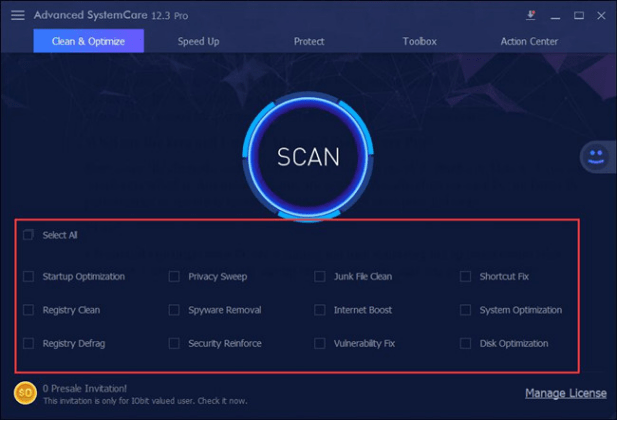
- Hit Fix to allow AdvancedSystemCare to repair the issues on your COMPUTER like corrupted files, windows registries, software program, and more.

Below, AdvancedSystemCare may recognize that the cefsharp.browsersubprocess.exe is harmed and tries to fix it instantly for you.
After that, check out the task supervisor to see if cefsharp browsersubprocess exe error stays on your device like complete disk use.
All in all, you can find out about what the cefsharp.browsersubprocess.exe is and also just how you fix blunders with it on Windows 10, 8, 7 from this brief write-up. It is likewise particularly offered that you wish to stay clear of experiencing cefsharp browsersubprocess exe worries, effort not to download and install programs or documents from undependable resources online, as well as check the tool routinely with a specialist gadget.

